

概要
HeartMuLa の GUI 環境である HeartMuLa Studio を
・Windows 11
・NVIDIA GeForce RTX 5060Ti 16GB
のローカル環境で動作させてみました。
ポイント
- PyTorch 2.4.1 + CUDA 12.4 (or CPU) では RTX 5060 Ti は利用不可
- PyTorch 2.7.0 + CUDA 12.8 で動作可能 (HeartMuLa Studio の前提条件から外れるが動いた)
HeartCodec のリポジトリ名変更が必要
→ 2026/02/28 に再度確認したところ、これは修正されてました。- Sharded モデル対応のため pipeline.py の修正が必要
※ 2026/02/23 時点の情報です。
まだ GPU 価格も大きく高騰していないタイミングのようなので、画像生成含めて試してみると面白いです。
HeartMuLa とは
HeartMuLa は、音楽を「作る・理解する・扱う」ためのオープンソースAIモデル集です。
以下で構成されます。
- HeartMuLa:歌詞やタグを渡すと、ほぼどんな言語でも音楽を作ってくれる音楽 AI
- HeartCodec:音楽データを軽量化しても音質をあまり損なわない高性能コーデック
- HeartTranscriptor:歌詞書き起こしに特化した Whisper ベースのAI
- HeartCLAP:音楽とテキストを共通埋め込み空間で結び、検索や対応付けを可能にする 音声-テキスト整合モデル
ひとことで言うと、音楽生成まわりを全部まとめて面倒見てくれるAIファミリーと言えます。
研究や開発向けなので、やや敷居が高い部分があるかもしれませんが、ローカル環境で音楽生成AIが動かせるのは非常に興味深いです。
公式サイト
GitHub
https://github.com/HeartMuLa/heartlib
Hugging Face
https://huggingface.co/HeartMuLa
ライセンス
上記 Hugging Face 上のモデルは、Apache 2.0 ライセンスで配布されています。https://huggingface.co/datasets/choosealicense/licenses/blob/main/markdown/apache-2.0.md
HeartMuLa Studio とは
HeartMuLa Studio は、HeartMuLa / heartlib 向けの Suno 風のAIによる音楽制作環境です。
GUI ベースで、テーマを指定すると歌詞の自動生成から、音声入り音楽の生成まで可能です。
参考音源を使った スタイル転送にも対応しています。
公式サイト
GitHub
https://github.com/fspecii/HeartMuLa-Studio
ライセンス
GitHub には、MIT ライセンスとあります。著作権表示とライセンス文を残すことで商用利用可能や改変も可能です。
License
This project is open source under the MIT License.
https://github.com/fspecii/HeartMuLa-Studio/?tab=readme-ov-file#license
ローカル実行環境の用意
PC 環境
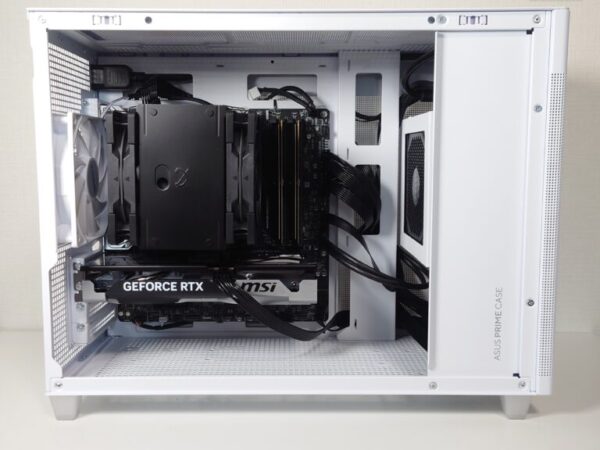
NVIDIA GeForce RTX 5060 Ti 16GB を搭載した自作 PC を使用します。
ソフトウェアの準備
いくつか必要なソフトウェアがありますので、事前にインストールしておきます。
実行環境は Windows 11 なので、いずれも Windows 版をインストールする形です。
(1) Python 3.11.9
試した中ではこれでうまくいきました。ほかのバージョンでもうまくいくかもしれません。
https://www.python.org/downloads/release/python-3119/
(2) Git
Git for Windows をインストールして、コマンドプロンプト・ターミナル経由で git コマンドが利用できるようにしておきます。
https://git-scm.com/install/windows
別の記事でも言及しているので必要に応じてご参照ください。
(3) Node.js
Frontend (Web UI) をビルドするのに、npm を利用しますので、Node.js をインストールしておきます。
https://nodejs.org/ja/download
(4) Ollama
歌詞の作成にローカルで実行している Ollama と連携できます。
あらかじめ、インストールしてモデルをダウンロードしておきます。
https://ollama.com/

(5) ffmpeg
最終的に mp3 で出力する際に必要となります。
Windows 用にコンパイルされた ffmpeg をダウンロードしてパスを通しておきます。
別の記事でも言及しているので、必要に応じてご参照ください。
ターミナルから ffmpeg -version を実行してバージョン情報が出力されれば大丈夫です。
(6) Hugging Face の Access Token
Backend の起動時に、自動的に Hugging Face から必要なモデルがダウンロードされますが、Hugging Face に接続するために Access Token が必要となります。
過去にそのユーザでそのPC上で設定したことがあれば
C:\Users\ユーザ名\.cache\huggingface\stored_tokens
に情報が残っていると思います。
Access Token の作成には、Hugging Face のアカウントが必要なので、なければ新規作成(サインアップ) します。
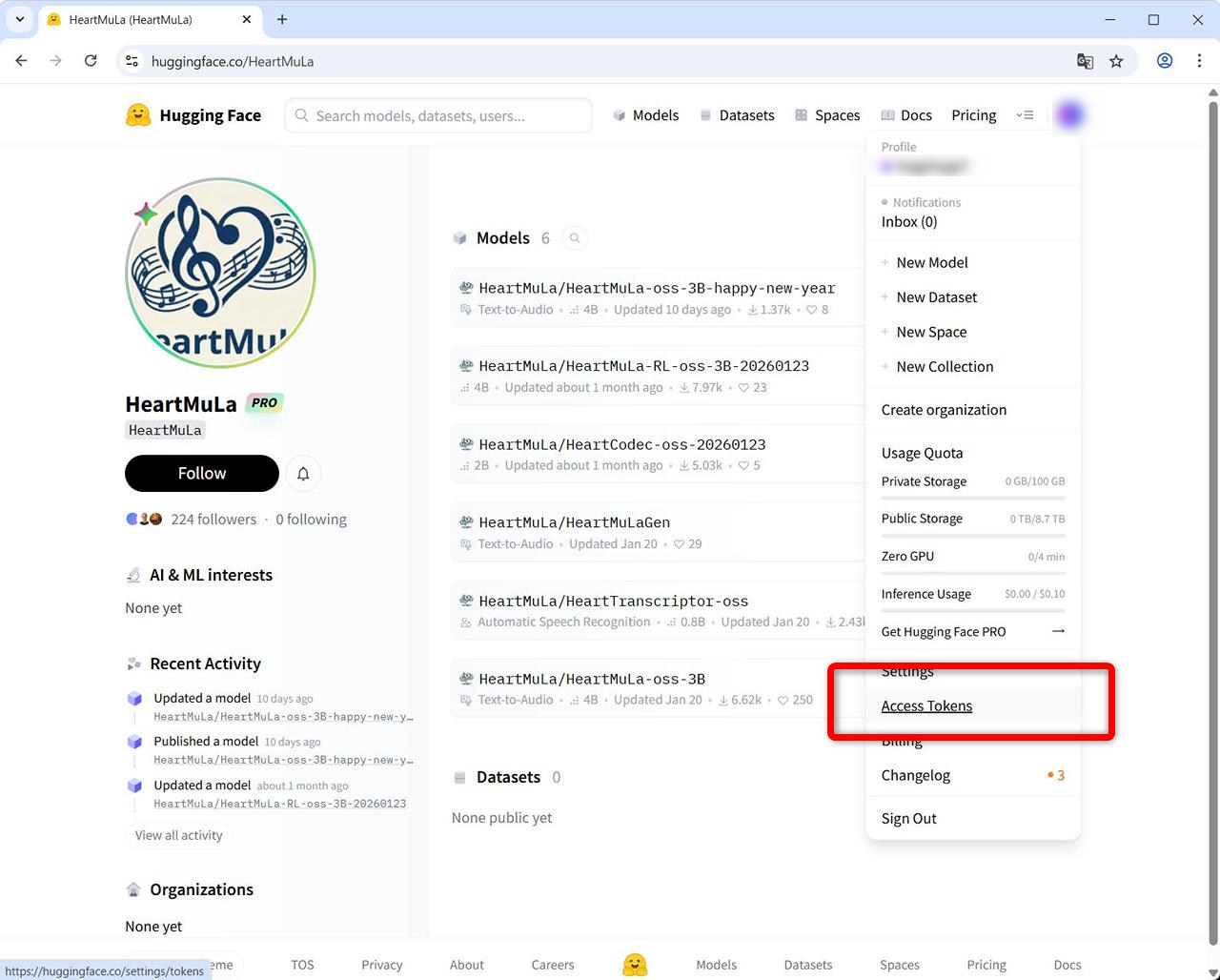
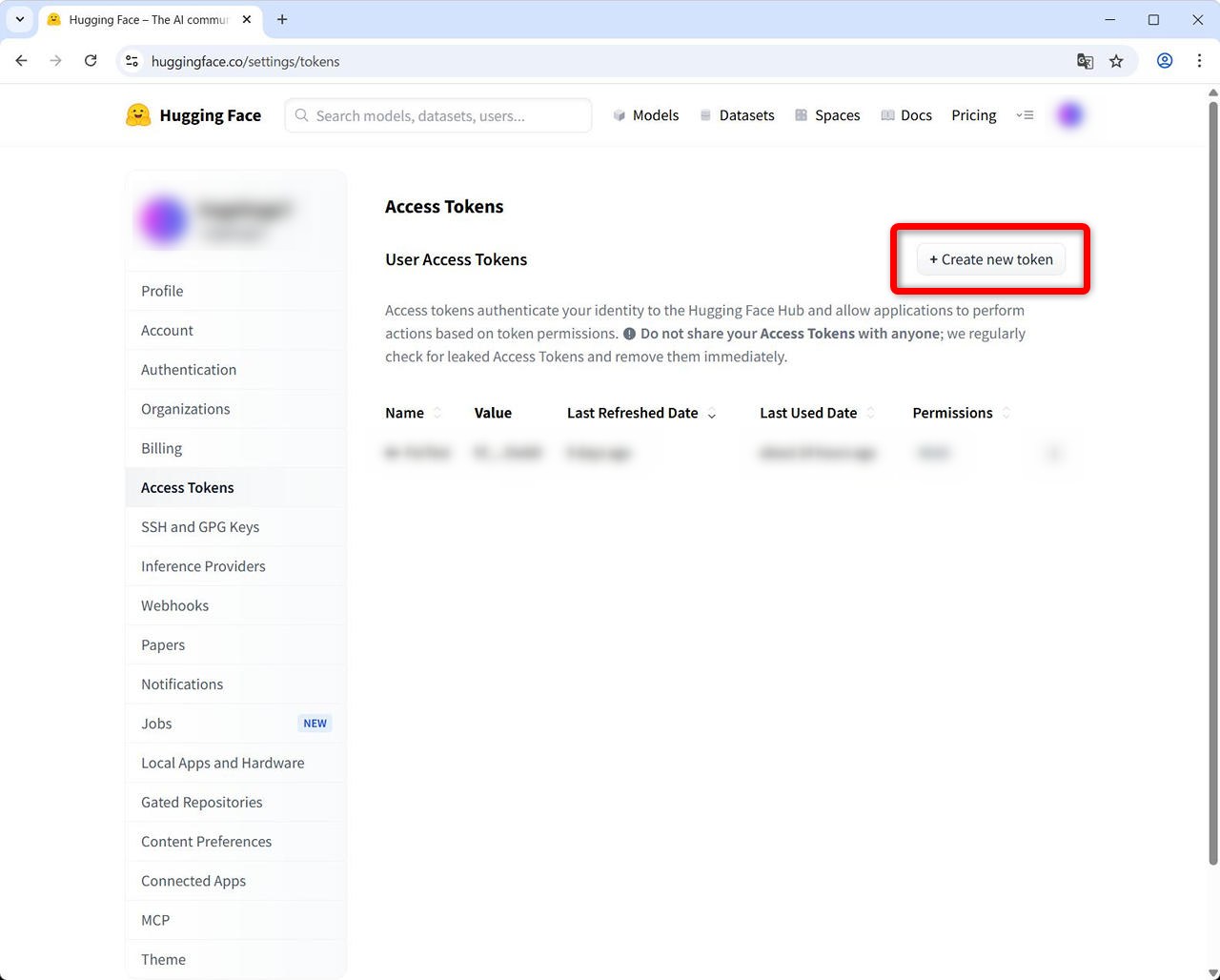
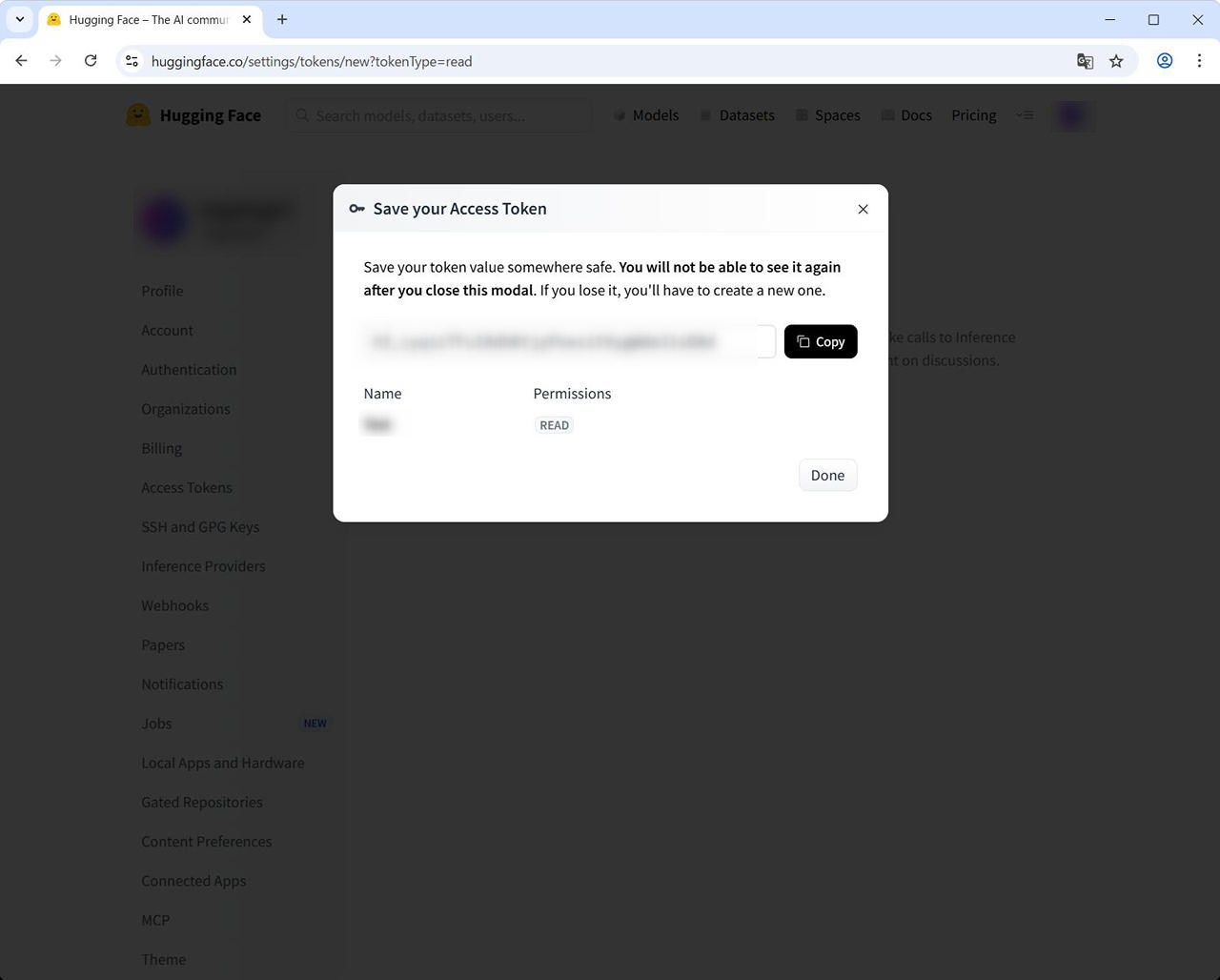
Hugging Face に ログイン(サインイン) 後に、右上のユーザアイコンをクリック – [Access Tokens] から作成できます。
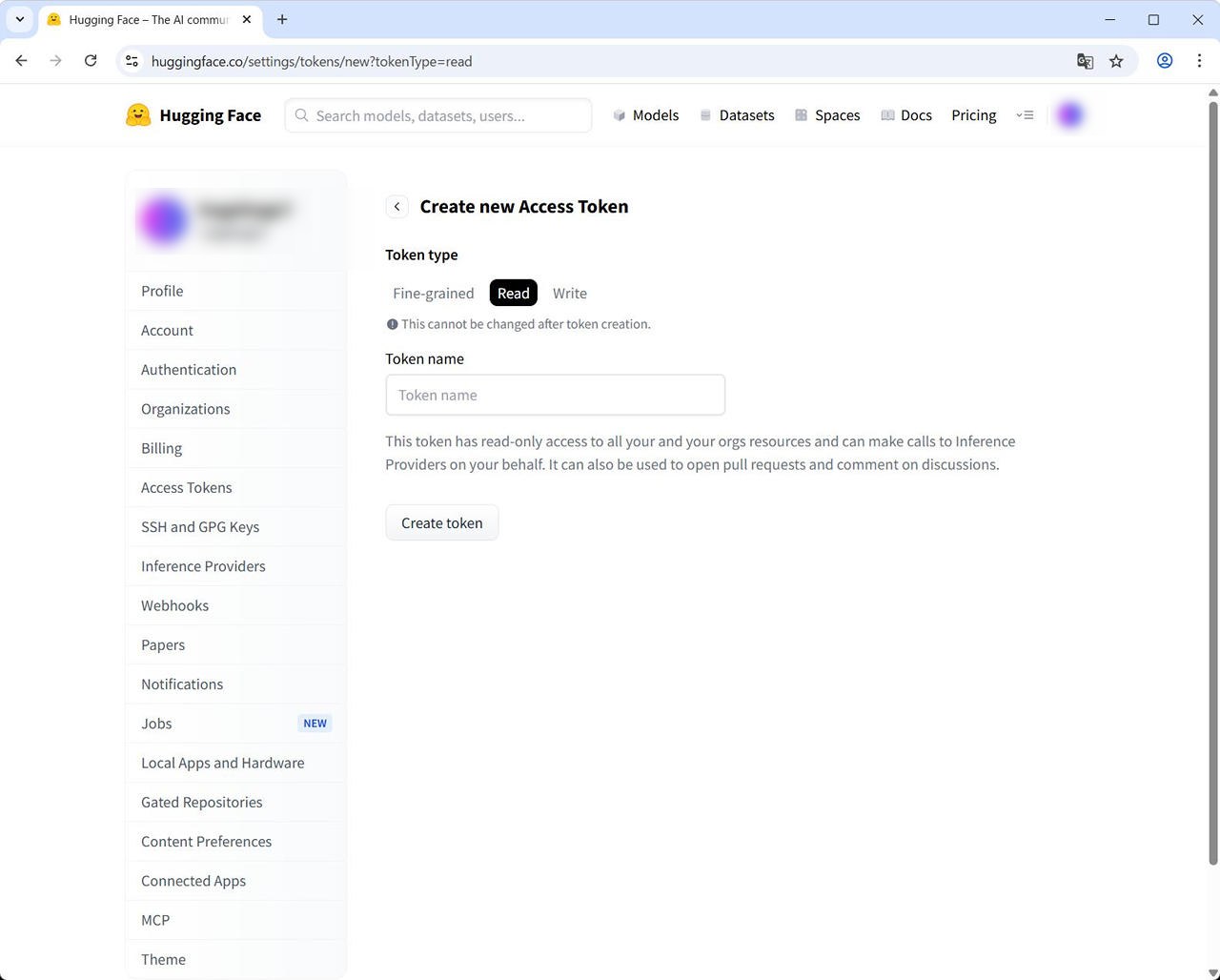
ここでは Read 権限の Token があれば問題ありません。
Token は、作成時にしか表示されませんので、必要に応じて安全な方法で保管してください。
環境構築
ベースは、HeartMuLa-Studio の GitHub にある手順に従います。
https://github.com/fspecii/HeartMuLa-Studio?tab=readme-ov-file#installation
HeartMuLa Studio 公開当初と現在では、Hugging Face 上のモデル構成が変更されています。
また、GeForce RTX 5060Ti に対応させるためにも、いくつか追加手順が必要です。
(1) GitHub の Repository を Clone
ここでは、C:\HeartMuLa-Studio に構築します。
ターミナルを開いて以下を実行します。
cd \
git clone https://github.com/fspecii/HeartMuLa-Studio.git
(2) Python 仮想環境を作成して、pip を最新にする
開いていたターミナルで以下を実行します。
cd HeartMuLa-Studio
py -3.11 -m venv venv
venv\Scripts\activate
python -m pip install --upgrade pip
(3) backend に必要なパッケージをインストール
venv を activate にした状態で実行します。
pip install -U 'triton-windows>=3.2,<3.3'
pip install torchCodec
pip install -r backend/requirements.txt
さらに以下も実行します。(2つ目は、途中に改行は入らず、一行で実行です。)
pip uninstall -y torch torchvision torchaudio
pip install torch==2.7.0 torchvision==0.22.0 torchaudio==2.7.0 --index-url https://download.pytorch.org/whl/cu128【補足説明】heartlib の依存関係により、デフォルトでは PyTorch 2.4.1 がインストールされます。
しかし、RTX 5060 Ti(SM 12.0)は CUDA 12.8 以降が必要であり、PyTorch 2.4.1 は CUDA 12.4 までしか対応していません。
そのため、2.4.1 のままでは GPU が利用できず、起動時にエラーとなります。
そこで本記事では、CUDA 12.8 に対応した PyTorch 2.7.0 を使用します。
(PyTorch 2.9.1 + CUDA 13.0 も試しましたが、音楽生成時にエラーが発生しました。)
実行時の出力例
※ インストール時に heartlib との依存関係エラーが表示されますが、動作には問題ないため無視します。
(venv) PS C:\HeartMuLa-Studio> pip uninstall -y torch torchvision torchaudio
Found existing installation: torch 2.4.1
Uninstalling torch-2.4.1:
Successfully uninstalled torch-2.4.1
Found existing installation: torchvision 0.19.1
Uninstalling torchvision-0.19.1:
Successfully uninstalled torchvision-0.19.1
Found existing installation: torchaudio 2.4.1
Uninstalling torchaudio-2.4.1:
Successfully uninstalled torchaudio-2.4.1
(venv) PS C:\HeartMuLa-Studio> pip install torch==2.7.0 torchvision==0.22.0 torchaudio==2.7.0 –index-url https://download.pytorch.org/whl/cu128
Looking in indexes: https://download.pytorch.org/whl/cu128
Collecting torch==2.7.0
Using cached https://download.pytorch.org/whl/cu128/torch-2.7.0%2Bcu128-cp311-cp311-win_amd64.whl.metadata (29 kB)
Collecting torchvision==0.22.0
Using cached https://download.pytorch.org/whl/cu128/torchvision-0.22.0%2Bcu128-cp311-cp311-win_amd64.whl.metadata (6.3 kB)
Collecting torchaudio==2.7.0
Using cached https://download.pytorch.org/whl/cu128/torchaudio-2.7.0%2Bcu128-cp311-cp311-win_amd64.whl.metadata (6.8 kB)
Requirement already satisfied: filelock in .\venv\Lib\site-packages (from torch==2.7.0) (3.24.3)
Requirement already satisfied: typing-extensions>=4.10.0 in .\venv\Lib\site-packages (from torch==2.7.0) (4.15.0)
Requirement already satisfied: sympy>=1.13.3 in .\venv\Lib\site-packages (from torch==2.7.0) (1.14.0)
Requirement already satisfied: networkx in .\venv\Lib\site-packages (from torch==2.7.0) (3.6.1)
Requirement already satisfied: jinja2 in .\venv\Lib\site-packages (from torch==2.7.0) (3.1.6)
Requirement already satisfied: fsspec in .\venv\Lib\site-packages (from torch==2.7.0) (2025.10.0)
Requirement already satisfied: numpy in .\venv\Lib\site-packages (from torchvision==0.22.0) (2.0.2)
Requirement already satisfied: pillow!=8.3.*,>=5.3.0 in .\venv\Lib\site-packages (from torchvision==0.22.0) (12.1.1)
Requirement already satisfied: mpmath<1.4,>=1.1.0 in .\venv\Lib\site-packages (from sympy>=1.13.3->torch==2.7.0) (1.3.0)
Requirement already satisfied: MarkupSafe>=2.0 in .\venv\Lib\site-packages (from jinja2->torch==2.7.0) (3.0.3)
Using cached https://download.pytorch.org/whl/cu128/torch-2.7.0%2Bcu128-cp311-cp311-win_amd64.whl (3338.3 MB)
Using cached https://download.pytorch.org/whl/cu128/torchvision-0.22.0%2Bcu128-cp311-cp311-win_amd64.whl (7.6 MB)
Using cached https://download.pytorch.org/whl/cu128/torchaudio-2.7.0%2Bcu128-cp311-cp311-win_amd64.whl (4.7 MB)
Installing collected packages: torch, torchvision, torchaudio
ERROR: pip’s dependency resolver does not currently take into account all the packages that are installed. This behaviour is the source of the following dependency conflicts.
heartlib 0.1.0 requires torch==2.4.1, but you have torch 2.7.0+cu128 which is incompatible.
heartlib 0.1.0 requires torchaudio==2.4.1, but you have torchaudio 2.7.0+cu128 which is incompatible.
heartlib 0.1.0 requires torchvision==0.19.1, but you have torchvision 0.22.0+cu128 which is incompatible.
Successfully installed torch-2.7.0+cu128 torchaudio-2.7.0+cu128 torchvision-0.22.0+cu128
(venv) PS C:\HeartMuLa-Studio>
(4) Hugging Face の Access Token の設定
backend の起動時に必要なモデルファイルを自動的にダウンロードしてきますが、Hugging Face へのアクセスのため Access Token を設定しておきます。
venv を activate にした状態で実行します。
hf auth login【補足説明】hf auth loginを実行すると途中で token の入力が促されますので入力します。
git の credential としても保存するかどうか聞かれますが、そこは任意でよいです。
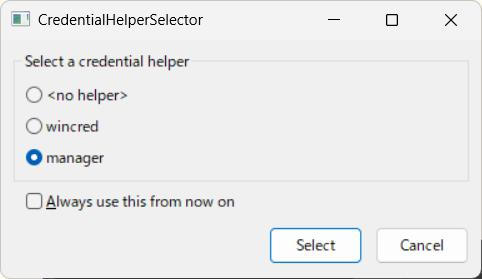
y にすると CredentialHelperSelector が表示されるので、選択して [Select] をクリックします。(CredentialHelperSelector を閉じないと先に進めません)
実行時の出力例
(venv) PS C:\HeartMuLa-Studio> hf auth login
    _|    _|  _|    _|    _|_|_|    _|_|_|  _|_|_|  _|      _|    _|_|_|      _|_|_|_|    _|_|      _|_|_|  _|_|_|_|
    _|    _|  _|    _|  _|        _|          _|    _|_|    _|  _|            _|        _|    _|  _|        _|
    _|_|_|_|  _|    _|  _|  _|_|  _|  _|_|    _|    _|  _|  _|  _|  _|_|      _|_|_|    _|_|_|_|  _|        _|_|_|
    _|    _|  _|    _|  _|    _|  _|    _|    _|    _|    _|_|  _|    _|      _|        _|    _|  _|        _|
    _|    _|    _|_|      _|_|_|    _|_|_|  _|_|_|  _|      _|    _|_|_|      _|        _|    _|    _|_|_|  _|_|_|_|
To log in, huggingface_hub requires a token generated from https://huggingface.co/settings/tokens .
Token can be pasted using ‘Right-Click’.
Enter your token (input will not be visible): トークンを入力
Add token as git credential? (Y/n) y
Token is valid (permission: read).
The token トークン名 has been saved to C:\Users\ユーザ名\.cache\huggingface\stored_tokens
Your token has been saved in your configured git credential helpers (helper-selector).
Your token has been saved to C:\Users\ユーザ名\.cache\huggingface\token
Login successful.
The current active token is: トークン名
(venv) PS C:\HeartMuLa-Studio>
Git の CredentialHelperSelector のサンプル
(5) HF_HEARTCODEC_REPO の変更
→ 2026/02/28 に再度確認したところ修正されていました。念のため残しておきます。
HeartMuLa の HeartCodec-oss のレポジトリが変更されているため、ファイルを書き換えます。
対象ファイル : music_service.py
C:\HeartMuLa-Studio\backend\app\services\music_service.py
53 行目変更前
HF_HEARTCODEC_REPO = "HeartMuLa/HeartCodec-oss"変更後
HF_HEARTCODEC_REPO = "HeartMuLa/HeartCodec-oss-20260123"ローカルの保存先フォルダ名に関する部分も変えてもよいかもしれませんが、今回は省略しています。
(6) pipeline.py の変更
Hugging Face の HeartCodec-oss-20260123 にあるモデルファイルは、現在は分割されて (Sharded) いますが、HeartMuLa Studio のモデルファイルの読み込み部分がこれに対応しておらず、エラーとなってしまいますので書き換えます。
対象ファイル : pipeline.py
C:\HeartMuLa-Studio\backend\heartmula\pipeline.py
修正箇所は、297行目から 418行目にある def _load_models 関数です。
いくつか変更が必要なので、以下に 変更後の def _load_models 関数全文を記載します。
右上のコピーボタンを使えば、インデントを含めてコピーできます。
(もしインデントが崩れるようなら、def の前は、スペース4つインデントが必要です。後続もそれに合わせてインデントを入れてください。)
    def _load_models(self):
        (
            mula_weights_path,
            mula_config_path,
            codec_path,
            tokenizer_path,
            gen_config_path,
        ) = _resolve_paths(
            self.ckpt_root,
            self.version,
            heartmula_weights_path=self.heartmula_weights_path,
        )

        from accelerate import init_empty_weights
        from mmgp import offload

        # Load tokenizer + gen config
        self.tokenizer = Tokenizer.from_file(str(tokenizer_path))
        self.gen_config = HeartMuLaGenConfig.from_file(str(gen_config_path))

        # Load HeartMuLa config
        with open(mula_config_path, encoding="utf-8") as fp:
            mula_config = HeartMuLaConfig(**json.load(fp))

        # Create empty model
        with init_empty_weights():
            self.mula = HeartMuLa(mula_config)

        # --- Add support for sharded HeartMuLa weights ---
        if mula_weights_path is None:
            sharded_mula = sorted(Path(self.ckpt_root).glob("model-*-of-*.safetensors"))
            if sharded_mula:
                mula_weights_path = [str(f) for f in sharded_mula]
            else:
                raise FileNotFoundError("HeartMuLa weights not found (no single file or shards detected)")

        # Quantized?
        is_quantized = "_int8" in str(mula_weights_path)
        if is_quantized:
            preprocess_fn = _dequantize_int8_state_dict
        else:
            preprocess_fn = _strip_heartmula_rope_cache

        # Load HeartMuLa weights
        offload.load_model_data(
            self.mula,
            mula_weights_path,
            default_dtype=None,
            writable_tensors=False,
            preprocess_sd=preprocess_fn,
        )

        # Decoder fix
        decoder = self.mula.decoder
        delattr(self.mula, "decoder")
        self.mula.decoder = [decoder]

        if hasattr(self.mula, "_interrupt_check"):
            self.mula._interrupt_check = self._abort_requested

        self.model = self.mula
        self.mula.eval()

        # Disable compilation
        self.mula.decoder[0].layers._compile_me = False
        self.mula.backbone.layers._compile_me = False

        first_param = next(self.mula.parameters(), None)
        if first_param is not None:
            self.mula_dtype = first_param.dtype

        # Resolve codec names
        codec_weights_name, codec_config_name = _resolve_codec_names(self.codec_version)

        # --- Add support for sharded HeartCodec weights ---
        if self.heartmula_weights_path and "quantized" in str(self.heartmula_weights_path):
            quantized_codec_path = Path(self.heartmula_weights_path).parent / "HeartMula_codec_int8.safetensors"
            if quantized_codec_path.is_file():
                codec_weights_path = quantized_codec_path
            else:
                quantized_codec_path = None
        else:
            quantized_codec_path = None

        if quantized_codec_path:
            codec_weights_path = quantized_codec_path
        else:
            sharded_codec = sorted(Path(codec_path).glob("model-*-of-*.safetensors"))
            if sharded_codec:
                codec_weights_path = [str(f) for f in sharded_codec]
            else:
                codec_weights_path = Path(codec_path) / codec_weights_name
                if not codec_weights_path.is_file():
                    codec_weights_path = Path(codec_path) / "model.safetensors"

        if not isinstance(codec_weights_path, list) and not codec_weights_path.is_file():
            raise FileNotFoundError(
                f"Expected HeartCodec weights at {codec_path}/{codec_weights_name} or model.safetensors but not found."
            )

        # Load codec config
        codec_config_path = Path(codec_path) / codec_config_name
        if not codec_config_path.is_file():
            codec_config_path = Path(codec_path) / "config.json"

        with open(codec_config_path, encoding="utf-8") as fp:
            codec_config = HeartCodecConfig(**json.load(fp))

        with init_empty_weights():
            self.codec = HeartCodec(codec_config)

        self.codec._offload_hooks = ["detokenize"]
        self.codec._model_dtype = self.VAE_dtype

        # Load codec weights
        offload.load_model_data(
            self.codec,
            codec_weights_path,
            default_dtype=self.VAE_dtype,
            writable_tensors=False,
            preprocess_sd=None,
        )

        self.codec.eval()

        first_param = next(self.codec.parameters(), None)
        if first_param is not None:
            self.codec_dtype = first_param.dtype

        self.sample_rate = getattr(self.codec, "sample_rate", 48000)
        self._offload_obj = None
【補足説明】
pipeline.py を修正せずに手元で単一ファイルとして作り直す形でも動きました。
重みファイルを手元で結合するには以下で可能です。
venv を activate してから行う形です。
cd .\backend\models\HeartCodec-oss\
python -c "from safetensors.torch import load_file, save_file; import glob; w={}; [w.update(load_file(f)) for f in sorted(glob.glob('model-*.safetensors'))]; save_file(w,'HeartMula_codec.safetensors')"
(7) Frontend のセットアップ
以下を実行します。
cd C:\HeartMuLa-Studio\frontend
npm install
npm run build
【補足説明】
npm install 実行時に 脆弱性について表示が出ますが、今回はローカル環境でのテスト利用に限定しているので、そのまま build しています。
実行時の出力例
(venv) PS C:\HeartMuLa-Studio> cd C:\HeartMuLa-Studio\frontend
(venv) PS C:\HeartMuLa-Studio\frontend> npm install
added 268 packages, and audited 269 packages in 6s
67 packages are looking for funding
run `npm fund` for details
12 vulnerabilities (1 moderate, 11 high)
To address issues that do not require attention, run:
npm audit fix
To address all issues (including breaking changes), run:
npm audit fix –force
Run `npm audit` for details.
(venv) PS C:\HeartMuLa-Studio\frontend> npm run build
> frontend@0.0.0 build
> tsc -b && vite build
vite v7.3.1 building client environment for production…
✓ 2159 modules transformed.
dist/index.html 0.49 kB │ gzip: 0.31 kB
dist/assets/index-nnSgdHv0.css 50.70 kB │ gzip: 8.38 kB
dist/assets/index-Bd-LrZYc.js 541.50 kB │ gzip: 163.49 kB
(!) Some chunks are larger than 500 kB after minification. Consider:
– Using dynamic import() to code-split the application
– Use build.rollupOptions.output.manualChunks to improve chunking: https://rollupjs.org/configuration-options/#output-manualchunks
– Adjust chunk size limit for this warning via build.chunkSizeWarningLimit.
✓ built in 2.92s
(venv) PS C:\HeartMuLa-Studio\frontend>
(8) HeartMuLa-Studio 起動
venv を activate にした状態で実行します。
cd C:\HeartMuLa-Studio\
python -m uvicorn backend.app.main:app --host 0.0.0.0 --port 8000
実行後、
[Startup] loading: 95% – Initializing pipeline…
[Startup] ready: 100% – Ready!
が表示されたら起動 OK です。
http://localhost:8000/ からアクセスできます。
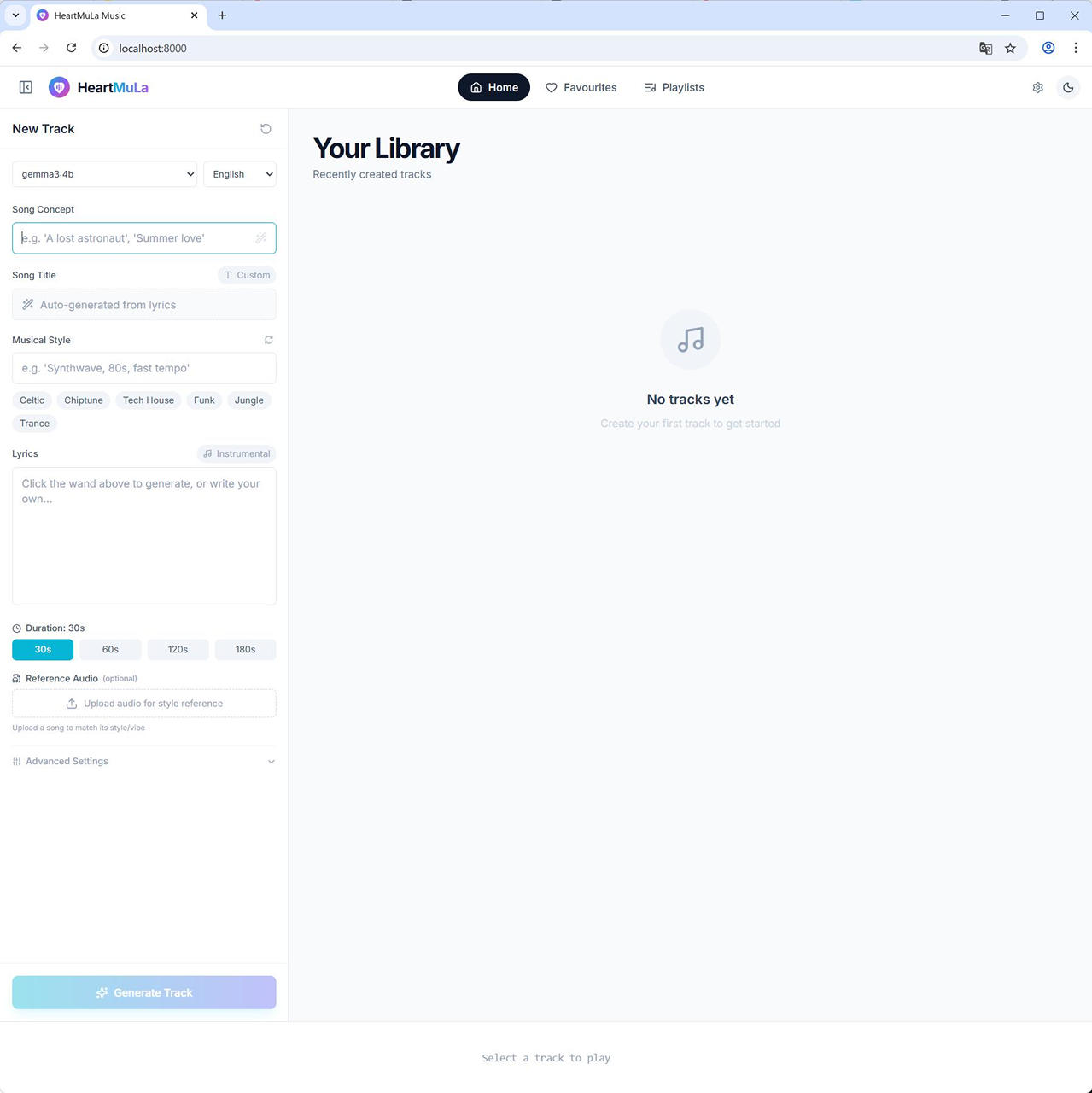
【補足説明
初回はモデルのダウンロードがあるので時間がかかります。
2回目以降もこれで起動できます。
初回実行時の出力例
(venv) PS C:\HeartMuLa-Studio> python -m uvicorn backend.app.main:app –host 0.0.0.0 –port 8000
W0223 14:45:43.557000 10876 venv\Lib\site-packages\torch\distributed\elastic\multiprocessing\redirects.py:29] NOTE: Redirects are currently not supported in Windows or MacOs.
INFO: Started server process [10876]
INFO: Waiting for application startup.
[Migration] Added generation_time_seconds column to job table
[Startup] downloading: 0% – Checking models…
[Startup] downloading: 5% – Preparing GPU…
[Startup] downloading: 10% – Downloading HeartMuLa-oss-3B-happy-new-year (~3GB)…
INFO: Application startup complete.
INFO: Uvicorn running on http://0.0.0.0:8000 (Press CTRL+C to quit)
C:\HeartMuLa-Studio\venv\Lib\site-packages\huggingface_hub\file_download.py:986: UserWarning: `local_dir_use_symlinks` parameter is deprecated and will be ignored. The process to download files to a local folder has been updated and do not rely on symlinks anymore. You only need to pass a destination folder as`local_dir`.
For more details, check out https://huggingface.co/docs/huggingface_hub/main/en/guides/download#download-files-to-local-folder.
warnings.warn(
config.json: 100%|████████████████████████████████████████████████████████████████████████████| 308/308 [00:00<?, ?B/s]
Xet Storage is enabled for this repo, but the ‘hf_xet’ package is not installed. Falling back to regular HTTP download. For better performance, install the package with: `pip install huggingface_hub[hf_xet]` or `pip install hf_xet`
Xet Storage is enabled for this repo, but the ‘hf_xet’ package is not installed. Falling back to regular HTTP download. For better performance, install the package with: `pip install huggingface_hub[hf_xet]` or `pip install hf_xet`
Xet Storage is enabled for this repo, but the ‘hf_xet’ package is not installed. Falling back to regular HTTP download. For better performance, install the package with: `pip install huggingface_hub[hf_xet]` or `pip install hf_xet`
Xet Storage is enabled for this repo, but the ‘hf_xet’ package is not installed. Falling back to regular HTTP download. For better performance, install the package with: `pip install huggingface_hub[hf_xet]` or `pip install hf_xet`
model.safetensors.index.json: 22.6kB [00:00, ?B/s]
README.md: 2.18kB [00:00, ?B/s].00B [00:00, ?B/s]
.gitattributes: 1.52kB [00:00, ?B/s]
model-00004-of-00004.safetensors: 100%|█████████████████████████████████████████████| 951M/951M [01:06<00:00, 14.4MB/s]
model-00002-of-00004.safetensors: 100%|███████████████████████████████████████████| 4.93G/4.93G [02:16<00:00, 36.0MB/s]
model-00001-of-00004.safetensors: 100%|███████████████████████████████████████████| 4.93G/4.93G [03:01<00:00, 27.2MB/s]
model-00003-of-00004.safetensors: 100%|███████████████████████████████████████████| 4.94G/4.94G [03:12<00:00, 25.7MB/s]
Fetching 8 files: 100%|██████████████████████████████████████████████████████████████████| 8/8 [03:13<00:00, 24.18s/it]
[Startup] downloading: 28% – HeartMuLa-oss-3B-happy-new-year downloaded███████████| 4.93G/4.93G [03:01<00:00, 44.5MB/s]
[Startup] downloading: 30% – Downloading HeartCodec (~1.5GB)…████████████▌ | 4.19G/4.94G [03:01<00:19, 38.5MB/s]
config.json: 100%|████████████████████████████████████████████████████████████████████████████| 981/981 [00:00<?, ?B/s]
model.safetensors.index.json: 83.9kB [00:00, ?B/s] | 0.00/981 [00:00<?, ?B/s]
Xet Storage is enabled for this repo, but the ‘hf_xet’ package is not installed. Falling back to regular HTTP download. For better performance, install the package with: `pip install huggingface_hub[hf_xet]` or `pip install hf_xet`
Xet Storage is enabled for this repo, but the ‘hf_xet’ package is not installed. Falling back to regular HTTP download. For better performance, install the package with: `pip install huggingface_hub[hf_xet]` or `pip install hf_xet`
.gitattributes: 1.52kB [00:00, 540kB/s]
README.md: 100%|████████████████████████████████████████████████████████████████████████████| 31.0/31.0 [00:00<?, ?B/s]
model-00002-of-00002.safetensors: 100%|███████████████████████████████████████████| 1.71G/1.71G [00:38<00:00, 44.4MB/s]
model-00001-of-00002.safetensors: 100%|███████████████████████████████████████████| 4.93G/4.93G [01:49<00:00, 45.2MB/s]
Fetching 6 files: 100%|██████████████████████████████████████████████████████████████████| 6/6 [01:50<00:00, 18.36s/it]
[Startup] downloading: 38% – HeartCodec downloaded
[Startup] downloading: 39% – Downloading tokenizer…
tokenizer.json: 9.09MB [00:00, 219MB/s]
gen_config.json: 100%|████████████████████████████████████████████████████████████████████████| 101/101 [00:00<?, ?B/s]
[Startup] downloading: 40% – All models downloaded
[Startup] loading: 45% – Loading HeartMuLa model…
[Auto-Config] Detected 1 GPU(s):
GPU 0: NVIDIA GeForce RTX 5060 Ti (14.7GB free / 15.9GB total, SM 12.0) – ✓ Flash Attention
[Auto-Config] Using FREE VRAM (14.7GB) for configuration (total: 15.9GB)
[Auto-Config] Selected: MMGP BF16 mode (14.7GB VRAM)
[Auto-Config] Configuration: mmgp bf16 (Single GPU)
[Config] Using mmgp memory management (recommended for this GPU)
[GPU Config] Flash Attention ENABLED for NVIDIA GeForce RTX 5060 Ti (SM 12.0)
[mmgp] Using bf16 precision (faster)
[mmgp] Creating pipeline with balanced optimization…
[mmgp] Found sharded model weights (4 shards), using C:\HeartMuLa-Studio\backend\models\HeartMuLa-oss-3B-happy-new-year\model-00001-of-00004.safetensors
[mmgp] Setting up profile 3 for memory management…
************ Memory Management for the GPU Poor (mmgp 3.7.6) by DeepBeepMeep ************
[mmgp] Profiling enabled (profile 3)
[Startup] loading: 95% – Initializing pipeline…
[Startup] ready: 100% – Ready!
音楽生成
(1) Ollama と連携させるので、Ollama はあらかじめ起動しておきます。
(2) HeartMuLa Studio の WebUI 左上で、使用する LLM を選択します。
日本語対応していて、ある程度早めに応答が来るモデルがよいです。
60秒以上かかるとタイムアウトしてしまうので、時間がかかるようであれば小さいモデルにするか、Ollama 側で手動で歌詞を生成するなどが必要です。
私の環境だと gemma3:4b がいいところかなと感じました。(生成速度と質の兼ね合いで)
(3) Japanese を選択します。
(4) Song Concept を入力します。
(5) Song Concept 欄右の Generate Lyrics & style with AI ボタンをクリックします。
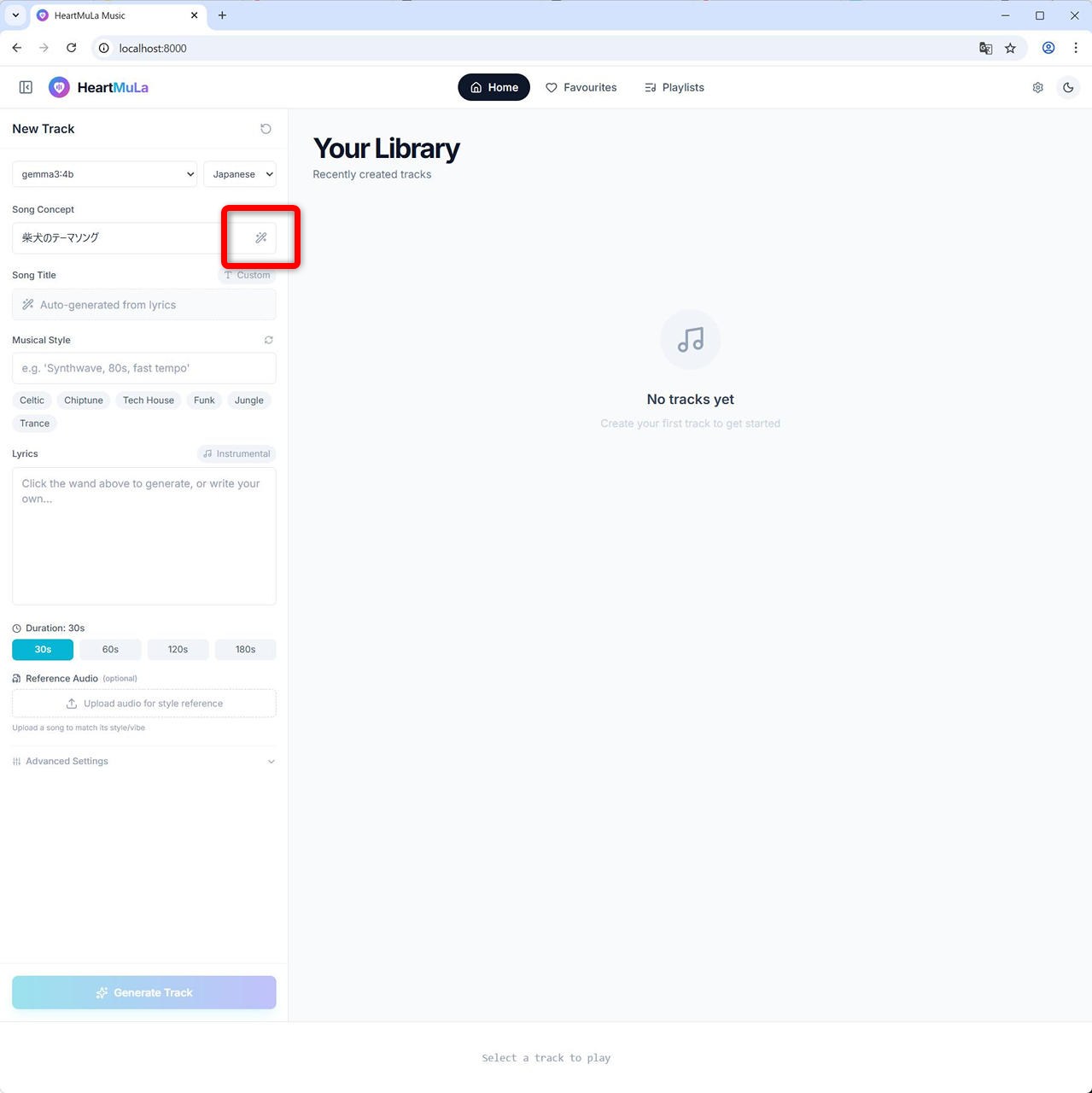
(6) LLM での生成を待ちます(60 秒でタイムアウトします)。
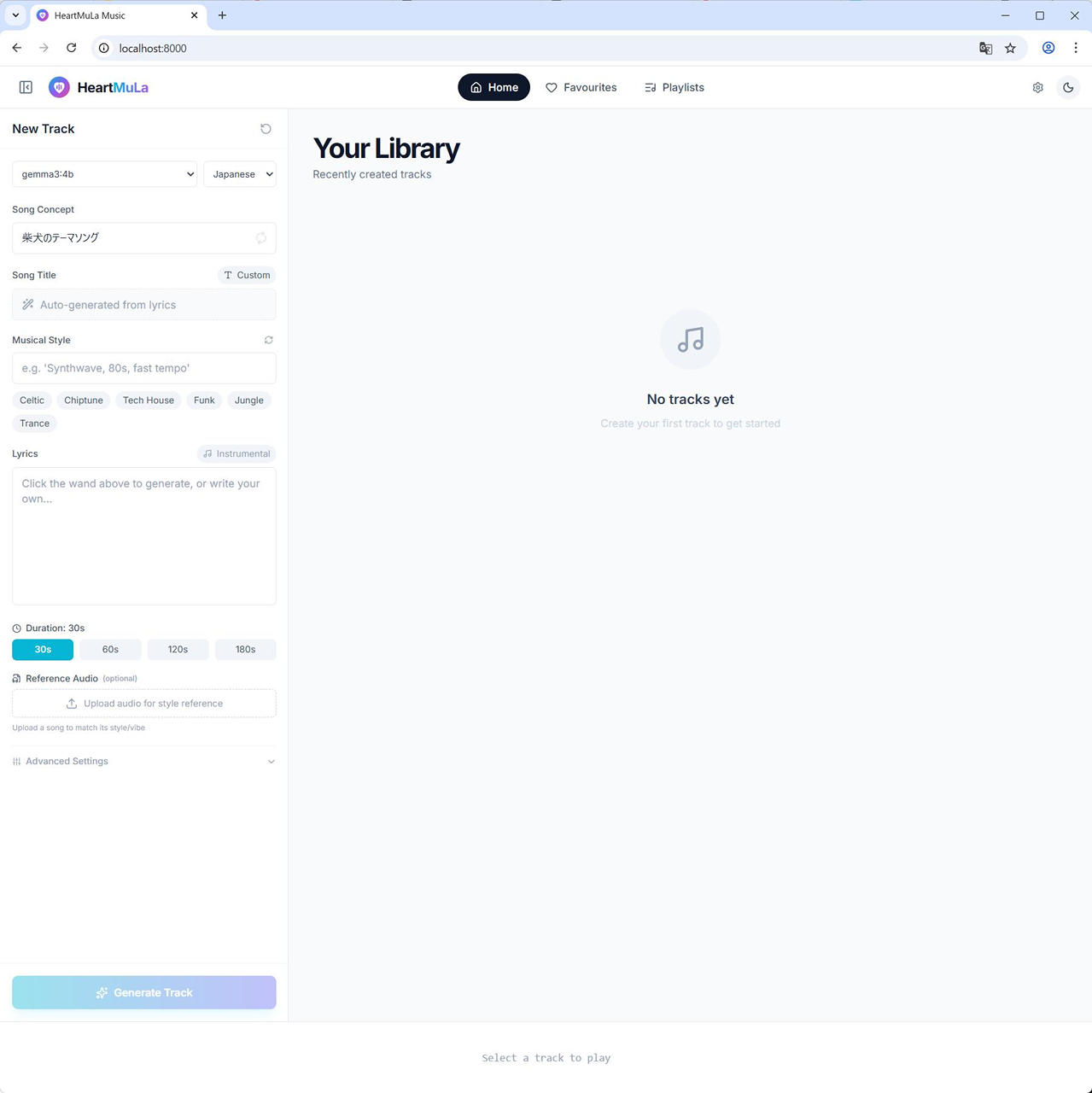
(7) [Song Concept], [Musical Style] および [Lyrics] が補完されます。
![HeartMuLa Studio - [Song Concept], [Musical Style] および [Lyrics] が補完される](https://iwannacreateapps.com/wp-content/uploads/2026/02/HeartMuLaStudio_09.jpg)
今回は、Song Concept として “柴犬のテーマソング” とだけ入力して、LLM で生成したところ以下となりました。
[Song Concept]A tender and nostalgic reflection on the unwavering loyalty and quiet beauty of a Shiba Inu companion.Japanese Folk, Ambient, Piano, Gentle, Melancholic※ 生成された原文そのままですが、結果には一部誤字がありました。
[Intro]
(Gentle, slightly melancholic piano chords begin, reminiscent of a Japanese folk song)
(Sound of a Shiba Inu panting softly)

[Verse 1]
雨上がりの空に 淡い光が降る
(Ameagari no sora ni awai hikari ga furu)
散歩道に 足跡が残る
(Sanpo do ni ashizuki ga nokoru)
忠実な瞳で 私を見つめる
(Chuujitsu na hitomi de watashi o mitsumeru)
まるで天使 静かに微笑む
(Marude tenshi shizuka ni hohoemu)

[Verse 2]
柴犬の毛並みは 太陽の金
(Shiba inu no kemuri wa taiyou no kin)
賢い頭と 優しい心
(Kutsui no atama to yasashii kokoro)
いつもそばに 寄り添う存在
(Itsumo soba ni yorikonna zou sei)
小さな幸せを 教えてくれる
(Chiisana shiawase o okoete kureru)

[Chorus]
柴犬のテーマソング 心に響く
(Shiba inu no temi soingu kokoro ni hibiku)
温かい絆で 結ばれていく
(Atatakai kizuna de musubareteiku)
忠誠の歌よ 永遠に
(Chuujitsu no uta yo toen ni)
僕らの心に 刻まれよう
(Bokura no kokoro ni kizamareyō)

[Bridge]
(Tempo slows slightly, a subtle string section enters)
まるでDrakeのように、人生は不確かな旅
(Marude Drake no you ni, jinsei wa fukakana tabi)
柴犬のように、今この瞬間を大切に
(Shiba inu no you ni, ima kono shunkan o taisetsu ni)
完璧じゃなくても、それが愛なのさ
(Kanpeki ja nakete mo, sore ga ai na nosa)

[Verse 3]
おやつをねだる 甘えた声
(Otsuke o negaru ameta koe)
無邪気な笑顔で 私を癒す
(Muzukey na egao de watashi o iyasu)
最高の相棒で 共に歩もう
(Saikou no aibō de tomori ayou)
人生の岐路で 導いてくれる
(Jinsei no kiro de michibiite kureru)

[Chorus]
柴犬のテーマソング 心に響く
(Shiba inu no temi soingu kokoro ni hibiku)
温かい絆で 結ばれていく
(Atatakai kizuna de musubareteiku)
忠誠の歌よ 永遠に
(Chuujitsu no uta yo toen ni)
僕らの心に 刻まれよう
(Bokura no kokoro ni kizamareyō)

[Outro]
(Piano chords return, fading slowly)
(Sound of a Shiba Inu whimpering softly)
柴犬… ずっと…
(Shiba inu… zutto…)
(Final piano chord rings out)
(8) Duration を設定し、Generate Track ボタンをクリックします。
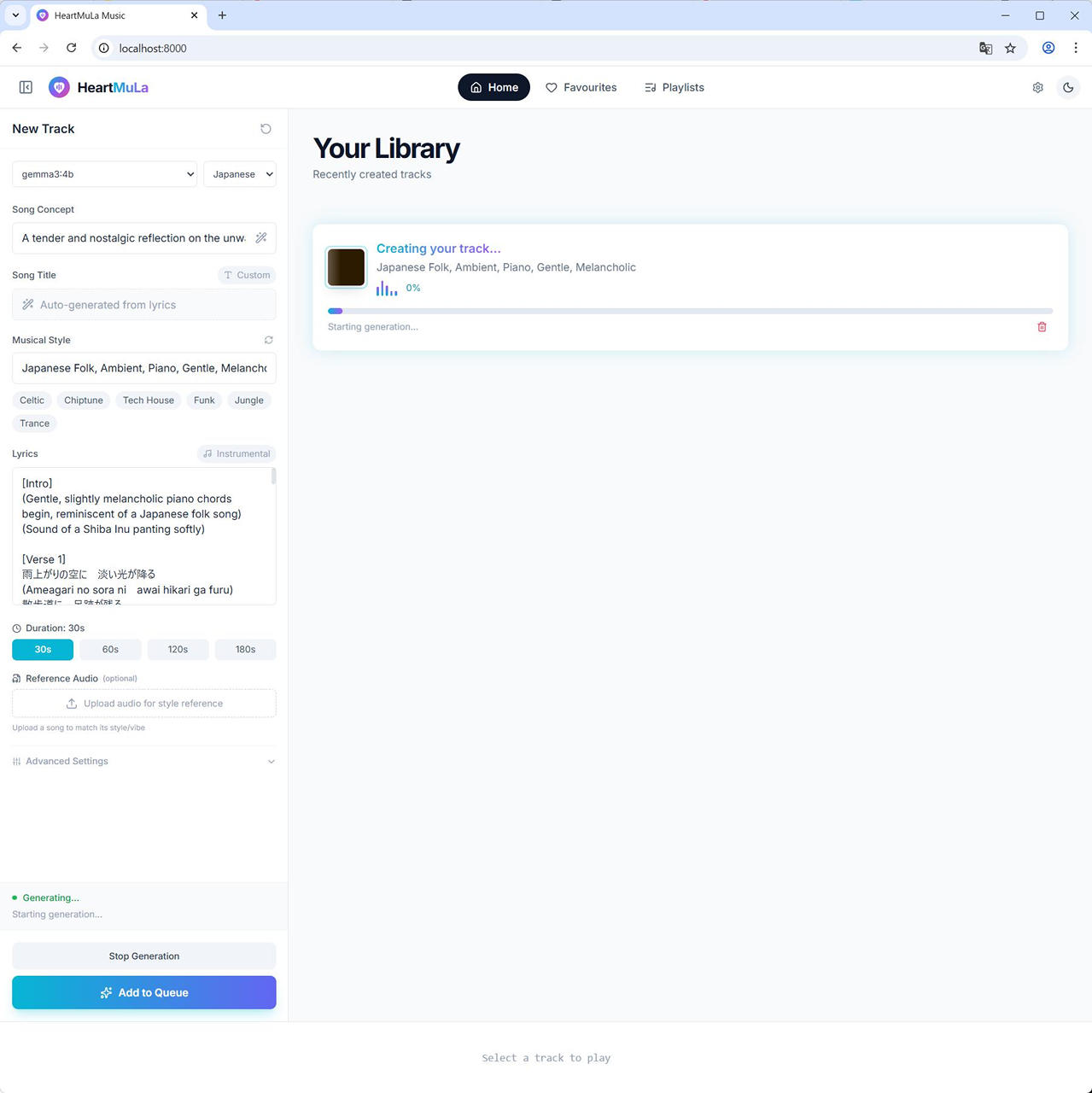
(9) 生成完了。30秒の楽曲生成に約51秒かかりました。
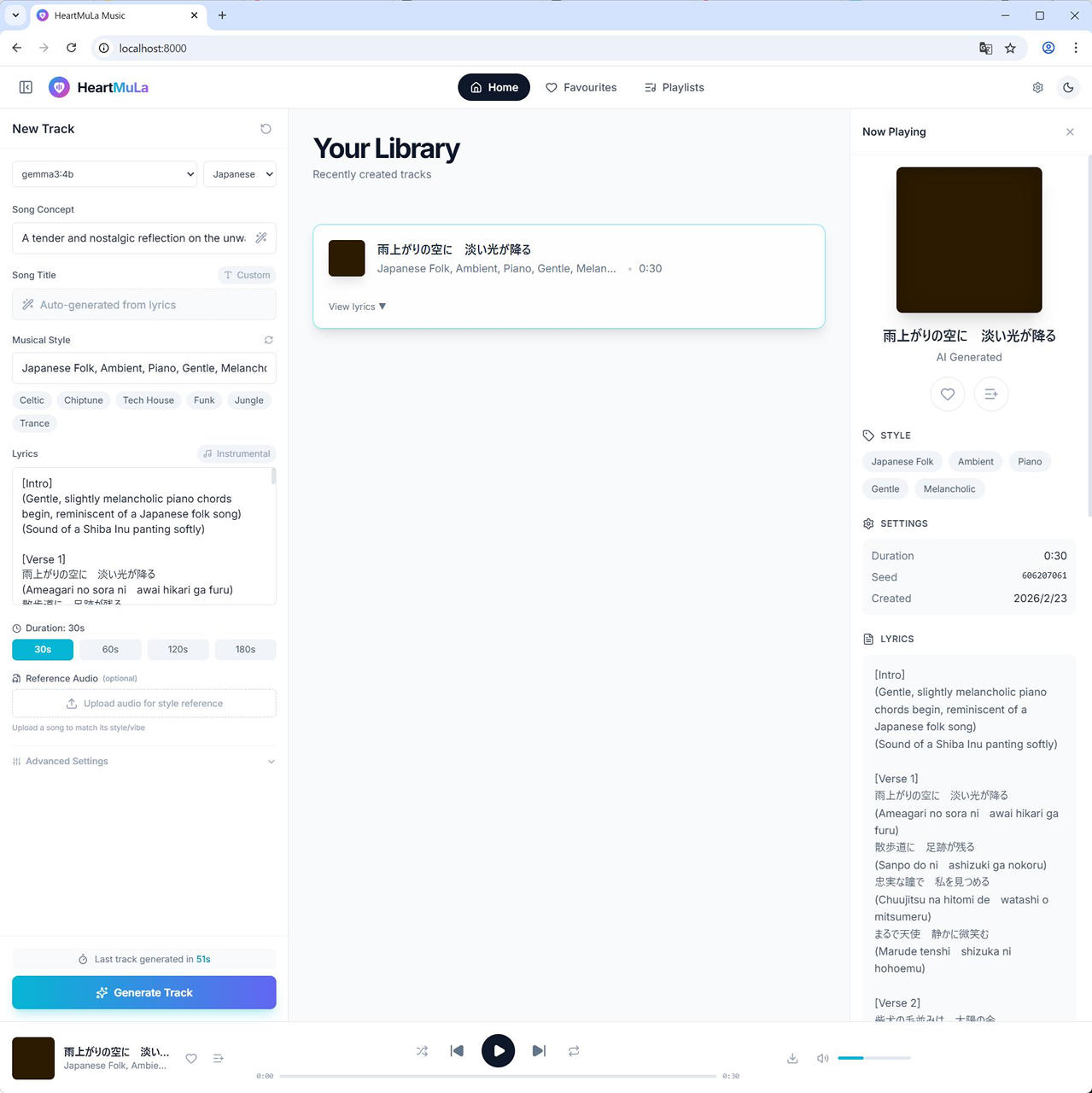
30秒バージョン
(10) 180秒の音楽生成だと 225秒 かかりました。
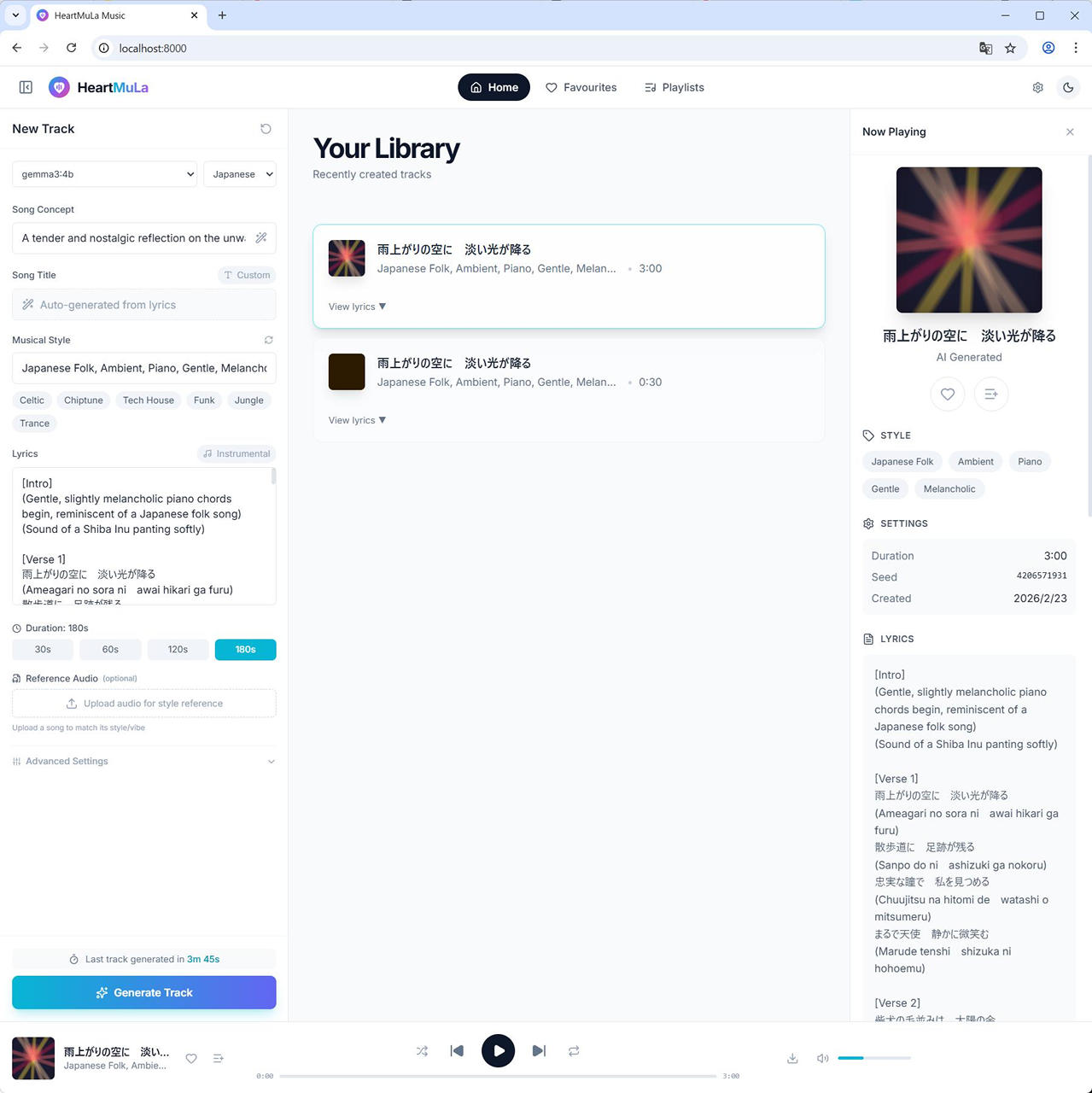
180秒バージョン
事前に作成した歌詞を利用することも可能です。
また、参照音源を指定して生成することもできます。
以上、参考となれば幸いです。
参考情報 : 発生したエラー
python -m uvicorn backend.app.main:app --host 0.0.0.0 --port 8000 実行時に発生したエラーのいくつかです。
記載した手順で、それぞれ回避しました。
(1) ❌ 401 エラー(Hugging Face 認証失敗)
401 エラーと、Invalid username or password. が特徴的な部分です。
Failed to load Heartlib model: 401 Client Error. (Request ID: Root=xxxx)
Repository Not Found for url: https://huggingface.co/api/models/HeartMuLa/HeartCodec-oss/revision/main.
Please make sure you specified the correct repo_id and repo_type.
If you are trying to access a private or gated repo, make sure you are authenticated. For more details, see https://huggingface.co/docs/huggingface_hub/authentication
Invalid username or password.
[Startup] error: 0% – Failed to load model: 401 Client Error. (Request ID: Root=xxxx)
Repository Not Found for url: https://huggingface.co/api/models/HeartMuLa/HeartCodec-oss/revision/main.
Please make sure you specified the correct repo_id and repo_type.
If you are trying to access a private or gated repo, make sure you are authenticated. For more details, see https://huggingface.co/docs/huggingface_hub/authentication
Invalid username or password.
Task exception was never retrieved
future: exception=RepositoryNotFoundError(‘401 Client Error. (Request ID: Root=xxxx)\n\nRepository Not Found for url: https://huggingface.co/api/models/HeartMuLa/HeartCodec-oss/revision/main.\nPlease make sure you specified the correct repo_id and repo_type.\nIf you are trying to access a private or gated repo, make sure you are authenticated. For more details, see https://huggingface.co/docs/huggingface_hub/authentication\nInvalid username or password.’)>
Traceback (most recent call last):
File “C:\HeartMuLa-Studio\venv\Lib\site-packages\huggingface_hub\utils_http.py”, line 403, in hf_raise_for_status
response.raise_for_status()
File “C:\HeartMuLa-Studio\venv\Lib\site-packages\requests\models.py”, line 1026, in raise_for_status
raise HTTPError(http_error_msg, response=self)
requests.exceptions.HTTPError: 401 Client Error: Unauthorized for url: https://huggingface.co/api/models/HeartMuLa/HeartCodec-oss/revision/main
The above exception was the direct cause of the following exception:
Traceback (most recent call last):
File “C:\HeartMuLa-Studio\backend\app\services\music_service.py”, line 1212, in initialize_with_progress
raise e
File “C:\HeartMuLa-Studio\backend\app\services\music_service.py”, line 1181, in initialize_with_progress
model_path = await self._download_models_with_progress(DEFAULT_MODEL_DIR, version)
^^^^^^^^^^^^^^^^^^^^^^^^^^^^^^^^^^^^^^^^^^^^^^^^^^^^^^^^^^^^^^^^^^^^^
File “C:\HeartMuLa-Studio\backend\app\services\music_service.py”, line 1122, in _download_models_with_progress
await loop.run_in_executor(
File “C:\Program Files\Python311\Lib\concurrent\futures\thread.py”, line 58, in run
result = self.fn(*self.args, *self.kwargs) ^^^^^^^^^^^^^^^^^^^^^^^^^^^^^^^^^^ File “C:\HeartMuLa-Studio\backend\app\services\music_service.py”, line 1124, in lambda: snapshot_download( ^^^^^^^^^^^^^^^^^^ File “C:\HeartMuLa-Studio\venv\Lib\site-packages\huggingface_hub\utils_validators.py”, line 114, in _inner_fn return fn(args, *kwargs) ^^^^^^^^^^^^^^^^^^^ File “C:\HeartMuLa-Studio\venv\Lib\site-packages\huggingface_hub_snapshot_download.py”, line 245, in snapshot_download raise api_call_error File “C:\HeartMuLa-Studio\venv\Lib\site-packages\huggingface_hub_snapshot_download.py”, line 165, in snapshot_download repo_info = api.repo_info(repo_id=repo_id, repo_type=repo_type, revision=revision) ^^^^^^^^^^^^^^^^^^^^^^^^^^^^^^^^^^^^^^^^^^^^^^^^^^^^^^^^^^^^^^^^^^^^^^ File “C:\HeartMuLa-Studio\venv\Lib\site-packages\huggingface_hub\utils_validators.py”, line 114, in _inner_fn return fn(args, *kwargs) ^^^^^^^^^^^^^^^^^^^ File “C:\HeartMuLa-Studio\venv\Lib\site-packages\huggingface_hub\hf_api.py”, line 2867, in repo_info return method( ^^^^^^^ File “C:\HeartMuLa-Studio\venv\Lib\site-packages\huggingface_hub\utils_validators.py”, line 114, in _inner_fn return fn(args, **kwargs)
^^^^^^^^^^^^^^^^^^^
File “C:\HeartMuLa-Studio\venv\Lib\site-packages\huggingface_hub\hf_api.py”, line 2661, in model_info
hf_raise_for_status(r)
File “C:\HeartMuLa-Studio\venv\Lib\site-packages\huggingface_hub\utils_http.py”, line 453, in hf_raise_for_status
raise _format(RepositoryNotFoundError, message, response) from e
huggingface_hub.errors.RepositoryNotFoundError: 401 Client Error. (Request ID: Root=xxxx)
Repository Not Found for url: https://huggingface.co/api/models/HeartMuLa/HeartCodec-oss/revision/main.
Please make sure you specified the correct repo_id and repo_type.
If you are trying to access a private or gated repo, make sure you are authenticated. For more details, see https://huggingface.co/docs/huggingface_hub/authentication
Invalid username or password.
(2) ❌ 404 エラー(Hugging Face のレポジトリがない)
404 Client Error: Not Found for url: https://huggingface.co/api/models/HeartMuLa/HeartCodec-oss/revision/main
が特徴的な部分です。
Repository Not Found for url: https://huggingface.co/api/models/HeartMuLa/HeartCodec-oss/revision/main.
Please make sure you specified the correct repo_id and repo_type.
If you are trying to access a private or gated repo, make sure you are authenticated. For more details, see https://huggingface.co/docs/huggingface_hub/authentication
Task exception was never retrieved
future: exception=RepositoryNotFoundError(‘404 Client Error. (Request ID: Root=xxxx)\n\nRepository Not Found for url: https://huggingface.co/api/models/HeartMuLa/HeartCodec-oss/revision/main.\nPlease make sure you specified the correct repo_id and repo_type.\nIf you are trying to access a private or gated repo, make sure you are authenticated. For more details, see https://huggingface.co/docs/huggingface_hub/authentication’)>
Traceback (most recent call last):
File “C:\HeartMuLa-Studio\venv\Lib\site-packages\huggingface_hub\utils_http.py”, line 403, in hf_raise_for_status
response.raise_for_status()
File “C:\HeartMuLa-Studio\venv\Lib\site-packages\requests\models.py”, line 1026, in raise_for_status
raise HTTPError(http_error_msg, response=self)
requests.exceptions.HTTPError: 404 Client Error: Not Found for url: https://huggingface.co/api/models/HeartMuLa/HeartCodec-oss/revision/main
The above exception was the direct cause of the following exception:
Traceback (most recent call last):
File “C:\HeartMuLa-Studio\backend\app\services\music_service.py”, line 1212, in initialize_with_progress
raise e
File “C:\HeartMuLa-Studio\backend\app\services\music_service.py”, line 1181, in initialize_with_progress
model_path = await self._download_models_with_progress(DEFAULT_MODEL_DIR, version)
^^^^^^^^^^^^^^^^^^^^^^^^^^^^^^^^^^^^^^^^^^^^^^^^^^^^^^^^^^^^^^^^^^^^^
File “C:\HeartMuLa-Studio\backend\app\services\music_service.py”, line 1122, in _download_models_with_progress
await loop.run_in_executor(
File “C:\Program Files\Python311\Lib\concurrent\futures\thread.py”, line 58, in run
result = self.fn(*self.args, *self.kwargs) ^^^^^^^^^^^^^^^^^^^^^^^^^^^^^^^^^^ File “C:\HeartMuLa-Studio\backend\app\services\music_service.py”, line 1124, in lambda: snapshot_download( ^^^^^^^^^^^^^^^^^^ File “C:\HeartMuLa-Studio\venv\Lib\site-packages\huggingface_hub\utils_validators.py”, line 114, in _inner_fn return fn(args, *kwargs) ^^^^^^^^^^^^^^^^^^^ File “C:\HeartMuLa-Studio\venv\Lib\site-packages\huggingface_hub_snapshot_download.py”, line 245, in snapshot_download raise api_call_error File “C:\HeartMuLa-Studio\venv\Lib\site-packages\huggingface_hub_snapshot_download.py”, line 165, in snapshot_download repo_info = api.repo_info(repo_id=repo_id, repo_type=repo_type, revision=revision) ^^^^^^^^^^^^^^^^^^^^^^^^^^^^^^^^^^^^^^^^^^^^^^^^^^^^^^^^^^^^^^^^^^^^^^ File “C:\HeartMuLa-Studio\venv\Lib\site-packages\huggingface_hub\utils_validators.py”, line 114, in _inner_fn return fn(args, *kwargs) ^^^^^^^^^^^^^^^^^^^ File “C:\HeartMuLa-Studio\venv\Lib\site-packages\huggingface_hub\hf_api.py”, line 2867, in repo_info return method( ^^^^^^^ File “C:\HeartMuLa-Studio\venv\Lib\site-packages\huggingface_hub\utils_validators.py”, line 114, in _inner_fn return fn(args, **kwargs)
^^^^^^^^^^^^^^^^^^^
File “C:\HeartMuLa-Studio\venv\Lib\site-packages\huggingface_hub\hf_api.py”, line 2661, in model_info
hf_raise_for_status(r)
File “C:\HeartMuLa-Studio\venv\Lib\site-packages\huggingface_hub\utils_http.py”, line 453, in hf_raise_for_status
raise _format(RepositoryNotFoundError, message, response) from e
huggingface_hub.errors.RepositoryNotFoundError: 404 Client Error. (Request ID: Root=xxxx)
Repository Not Found for url: https://huggingface.co/api/models/HeartMuLa/HeartCodec-oss/revision/main.
Please make sure you specified the correct repo_id and repo_type.
If you are trying to access a private or gated repo, make sure you are authenticated. For more details, see https://huggingface.co/docs/huggingface_hub/authentication
(3) ❌ Torch not compiled with CUDA enabled (PyTorch が RTX 5060Ti に対応していない)
PyTorch 2.4.1 (CPU版) をインストールしたまま起動した際のエラーです。
Torch not compiled with CUDA enabled が特徴的なところです。
…
[Quantization] Loading HeartMuLa with 4-bit NF4 quantization…torch_dtype is deprecated! Use dtype instead!Failed to load Heartlib model: Torch not compiled with CUDA enabled
[Startup] error: 0% – Failed to load model: Torch not compiled with CUDA enabled
Task exception was never retrieved
future: exception=AssertionError(‘Torch not compiled with CUDA enabled’)>
Traceback (most recent call last):
File “C:\HeartMuLa-Studio\backend\app\services\music_service.py”, line 1212, in initialize_with_progress
raise e
File “C:\HeartMuLa-Studio\backend\app\services\music_service.py”, line 1196, in initialize_with_progress
self.pipeline = await loop.run_in_executor(
^^^^^^^^^^^^^^^^^^^^^^^^^^^
File “C:\Program Files\Python311\Lib\concurrent\futures\thread.py”, line 58, in run
result = self.fn(*self.args, *self.kwargs) ^^^^^^^^^^^^^^^^^^^^^^^^^^^^^^^^^^ File “C:\HeartMuLa-Studio\backend\app\services\music_service.py”, line 1198, in lambda mp=model_path, v=version: self.load_pipeline_multi_gpu(mp, v) ^^^^^^^^^^^^^^^^^^^^^^^^^^^^^^^^^^^^ File “C:\HeartMuLa-Studio\backend\app\services\music_service.py”, line 1430, in _load_pipeline_multi_gpu pipeline = create_quantized_pipeline( ^^^^^^^^^^^^^^^^^^^^^^^^^^ File “C:\HeartMuLa-Studio\backend\app\services\music_service.py”, line 690, in create_quantized_pipeline heartmula = HeartMuLa.from_pretrained( ^^^^^^^^^^^^^^^^^^^^^^^^^^ File “C:\HeartMuLa-Studio\venv\Lib\site-packages\transformers\modeling_utils.py”, line 277, in _wrapper return func(args, **kwargs)
^^^^^^^^^^^^^^^^^^^^^
File “C:\HeartMuLa-Studio\venv\Lib\site-packages\transformers\modeling_utils.py”, line 5051, in from_pretrained
) = cls._load_pretrained_model(
^^^^^^^^^^^^^^^^^^^^^^^^^^^
File “C:\HeartMuLa-Studio\venv\Lib\site-packages\transformers\modeling_utils.py”, line 5435, in _load_pretrained_model
caching_allocator_warmup(model, expanded_device_map, hf_quantizer)
File “C:\HeartMuLa-Studio\venv\Lib\site-packages\transformers\modeling_utils.py”, line 6092, in caching_allocator_warmup
index = device.index if device.index is not None else torch_accelerator_module.current_device()
^^^^^^^^^^^^^^^^^^^^^^^^^^^^^^^^^^^^^^^^^
File “C:\HeartMuLa-Studio\venv\Lib\site-packages\torch\cuda__init_.py”, line 878, in current_device
lazy_init() File “C:\HeartMuLa-Studio\venv\Lib\site-packages\torch\cuda__init_.py”, line 305, in _lazy_init
raise AssertionError(“Torch not compiled with CUDA enabled”)
AssertionError: Torch not compiled with CUDA enabled
(4) ❌ Failed to load Heartlib model (Sharded されたモデルファイルが読み込めない)
HeartCodec-oss/HeartMula_codec.safetensors or model.safetensors but not found. が特徴的な部分かと思います。
HeartCodec-oss-20260123 にあるモデルファイルが分割 (Sharded) されていて処理できない際に発生したエラーです。pipeline.py を書き換えるか、手動で結合する必要があります。
Failed to load Heartlib model: Expected HeartCodec weights at C:\HeartMuLa-Studio\backend\models\HeartCodec-oss/HeartMula_codec.safetensors or model.safetensors but not found.
[Startup] error: 0% – Failed to load model: Expected HeartCodec weights at C:\HeartMuLa-Studio\backend\models\HeartCodec-oss/HeartMula_codec.safetensors or model.safetensors but not found.
Task exception was never retrieved
future: exception=FileNotFoundError(‘Expected HeartCodec weights at C:\\HeartMuLa-Studio\backend\models\HeartCodec-oss/HeartMula_codec.safetensors or model.safetensors but not found.’)>
Traceback (most recent call last):
File “C:\HeartMuLa-Studio\backend\app\services\music_service.py”, line 1212, in initialize_with_progress
raise e
File “C:\HeartMuLa-Studio\backend\app\services\music_service.py”, line 1196, in initialize_with_progress
self.pipeline = await loop.run_in_executor(
^^^^^^^^^^^^^^^^^^^^^^^^^^^
File “C:\Program Files\Python311\Lib\concurrent\futures\thread.py”, line 58, in run
result = self.fn(*self.args, **self.kwargs)
^^^^^^^^^^^^^^^^^^^^^^^^^^^^^^^^^^
File “C:\HeartMuLa-Studio\backend\app\services\music_service.py”, line 1198, in
lambda mp=model_path, v=version: self._load_pipeline_multi_gpu(mp, v)
^^^^^^^^^^^^^^^^^^^^^^^^^^^^^^^^^^^^
File “C:\HeartMuLa-Studio\backend\app\services\music_service.py”, line 1372, in _load_pipeline_multi_gpu
pipeline = create_mmgp_pipeline(
^^^^^^^^^^^^^^^^^^^^^
File “C:\HeartMuLa-Studio\backend\app\services\music_service.py”, line 601, in create_mmgp_pipeline
pipeline = HeartMuLaPipeline(
^^^^^^^^^^^^^^^^^^
File “C:\HeartMuLa-Studio\backend\heartmula\pipeline.py”, line 295, in init
self._load_models()
File “C:\HeartMuLa-Studio\backend\heartmula\pipeline.py”, line 374, in _load_models
raise FileNotFoundError(
FileNotFoundError: Expected HeartCodec weights at C:\HeartMuLa-Studio\backend\models\HeartCodec-oss/HeartMula_codec.safetensors or model.safetensors but not found.
以上、参考となれば幸いです。